Put model data into a usable application
XGameDev develops custom 3D model viewers for teams that need to inspect geometry and its associated information. A viewer can let people select building elements, isolate layers, measure distances, take cross-sections and attach comments within an agreed workflow.
Our Unity development covers browser, iOS and Android delivery. We start with representative source models and the task your users need to complete, then test the import pipeline and interaction on the intended hardware.
V2E: construction model review across web and mobile
For Vision 2 Estimating, XGameDev worked as a subcontractor to Transformr. We developed the Unity model viewer, a SketchUp Ruby export plugin and the Unity side of the WebGL communication bridge.
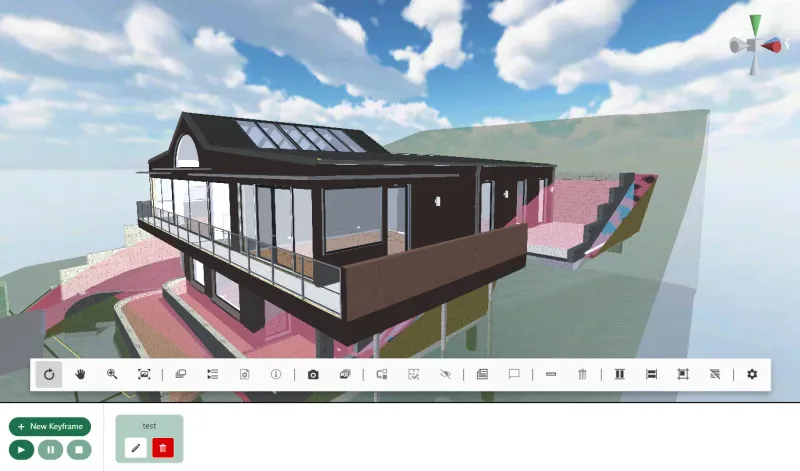
The viewer connects building geometry with layer, entity and cost-code data. Its inspection tools include orbit and first-person navigation, selection, layer visibility, measurements, cross-sections, entity-linked comments and camera animations.
We also built the initial Node.js, MongoDB and Angular prototype. Another team developed the production Angular application and its side of the bridge; the final production build ran on the client's Azure server. The case study separates those responsibilities and explains the mobile release work.
Keep geometry and metadata connected
A model viewer often needs more than a mesh. Users may need the selected object's name, trade, cost code or parent relationship. We agree which properties must survive export and how the application will use them.
Our V2E work exported SketchUp geometry to glTF/GLB with accompanying metadata for layers, entities, materials and other model properties. That is a demonstrated pipeline. Other source formats need assessment with sample files before we commit to import coverage or metadata preservation.
Choose the inspection tools your workflow needs
- Navigation and saved views: orbit, pan, zoom or walk through the model, with viewpoints that users can return to.
- Selection and visibility: inspect an element, select several objects, or isolate a relevant part of the model.
- Measurements and cross-sections: investigate dimensions and internal geometry using agreed units and interaction rules.
- Comments and model-linked data: associate observations with elements and connect them to an application's records.
- Presentation tools: capture screenshots or record camera movements for a review or explanation.
These are features to scope around your users. A construction estimator, a field technician and a client reviewing a design may need different tools and levels of access.
Connect the viewer to your application
We can develop the viewer component alongside your existing application team. The integration contract defines events, commands, model retrieval, authentication and saved state so the viewer and surrounding interface behave consistently.
On V2E, that included selection and camera commands, model loading from the client's API and Azure Blob Storage, and coordination between web inputs and Unity controls. Our full-stack development service covers supporting APIs where those are part of our scope.
Test with real models and target devices
Large models can expose problems with loading, memory, materials and selection. We profile representative files and agree checks for geometry, required properties, measurement behaviour and interaction speed. A desktop result is not a substitute for testing on the target phone or tablet.
The first milestone can be one model loaded with its essential inspection tool working. That lets us evaluate the export process and performance before building the wider application.
Send a model and describe the decision
Include the source format, a representative file, approximate model sizes, required properties and target devices. Tell us what the user needs to decide or record while viewing it, and how new model versions will reach the application.
For the wider industry context, see construction and engineering application development. For location and spatial datasets, see GIS and engineering visualisation.