
Be more productive with RescueTime
How RescueTime and the Pareto principle helped me track my time and get more done as a freelance developer.
← All articles
TL;DR
- RescueTime is a background app that tracks which apps and sites you spend time on, then scores each day with a Productivity Pulse.
- I aim to keep my Productivity Pulse above 80%, using the Pareto principle (80/20 rule) as the rough target.
- It's a personal-use tool, not something to turn into employee or family surveillance.
- Pairing it with Apple's Screen Time covers the gap between desktop work and phone use.
What did I do today?
This was a question I often asked myself at night while planning the next day.
As a freelance developer, I’m always searching for ways to gain more productive time so I can spend more of it with my family.
Back in 2015, I discovered a neat little tool called RescueTime.
RescueTime is an app that you install on your devices, and it tracks your activity. Don’t worry, it’s safe!
For example, it shows what you’ve been doing each day. Sometimes that’s good, and sometimes… not so much.
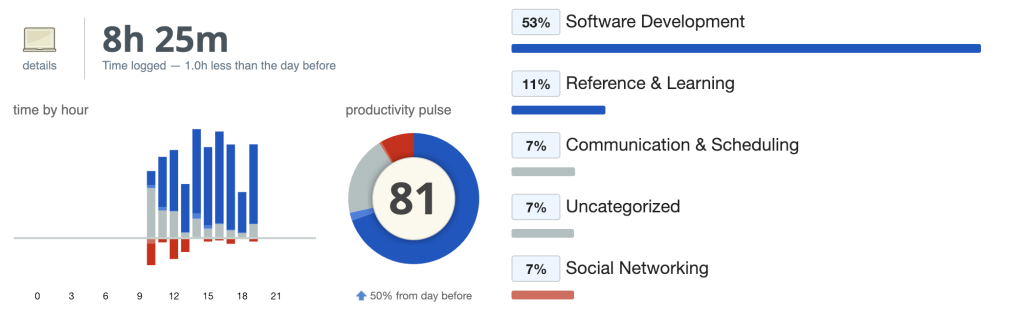
Here’s an example of a good, productive day:
And here’s an example of a distracted day:
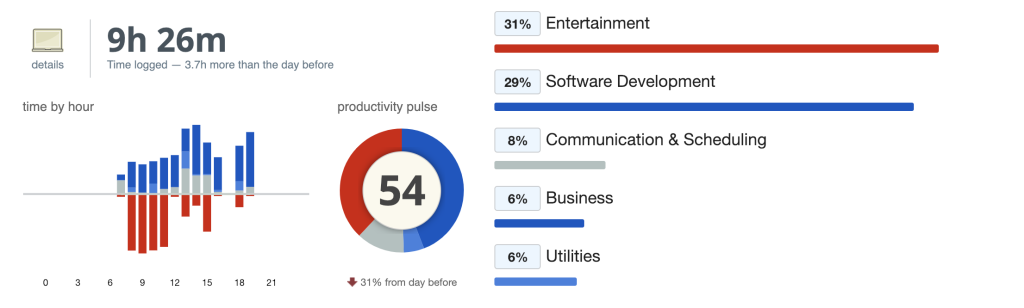
My key metric is the Productivity Pulse, which I aim to keep above 80%, thanks to the Pareto principle (the 80/20 rule).
This tool is mostly for personal use and should not be used as a monitoring tool for employees or family members.
Combining RescueTime with Apple’s Screen Time gives you a clear picture of where your time goes each day.
RescueTime has been useful for my productivity as a freelance developer. By tracking where my time goes and using the insights to stay focused, I’ve been able to balance work and family time more effectively. If you’re struggling to stay productive or curious about how you spend your time, I highly recommend giving it a try.
If time-tracking is your thing, I go into more of my setup in Years of Experience vs Hours of Experience, and if you're trying to make working from home actually work, see How to Work From Home Productively.